

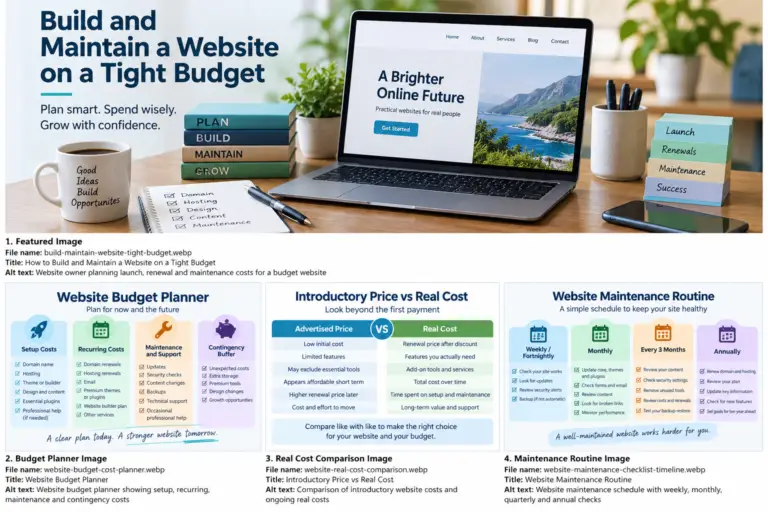
Learning how to build a website on a tight budget means choosing a setup you can afford to launch and keep running. The initial price matters, but so do renewal costs, maintenance and the features you actually need.
Before spending anything, ask a better question than “What is the cheapest way to get online?” Ask: “What does this website need to do, and what can I realistically afford—in money and time?”
My approach is to begin with a manageable website that performs its main job well. Put the essentials in place, understand the ongoing commitments and add paid features only when they solve a clear problem or save worthwhile time.
This guide explains how to decide what to prioritise, compare the real cost of hosting and website tools, choose a setup you can maintain and keep the site useful after launch.
Decide What Your Website Needs Before You Spend
Before comparing hosting plans, website builders or themes, describe the website’s main job in one sentence:
My website needs to help [a particular visitor] take [a specific action].
For a local service business, that might mean helping potential customers understand the services and request a quote. For a blog, it might mean helping readers find useful answers and continue to related articles; our guide to web hosting for bloggers looks more closely at what bloggers actually need from a hosting plan.
Use that sentence as a filter for the project. A website designed to generate enquiries needs different pages and functions from one that processes orders. Build around your own visitor and goal rather than copying every feature you see on another site.
Separate launch essentials from later ideas.
Make two short lists:
- Needed for launch: The pages, content and functions visitors need to understand the website and complete its main action. For a service business, this may include clear service information, genuine examples of the work, contact details and a working enquiry form.
- Can wait: Features that are not necessary for the first version. Depending on the project, these might include elaborate animations, advanced marketing tools, a membership area or a booking system you are not yet ready to use.
Define what “ready to launch” means.
For a simple service website, it may mean that the essential pages are complete, the content is readable on a phone, the contact details are correct and a test enquiry reaches the right inbox.
That gives the project a practical stopping point. The website does not need every possible feature before it can begin doing useful work.
Before approving another purchase, ask:
Which launch requirement does this meet?
When the answer is unclear, move it to the later list rather than adding it to the launch budget.
Set a Budget for Launch, Renewals and Maintenance
A website budget should show three things: what it costs to get the site online, what it costs to keep it online and what it costs to keep it useful.
Looking only at the first payment can make an affordable setup appear cheaper than it really is. A discounted hosting term may eventually renew at a higher price, while email, paid tools or occasional technical help may sit outside the advertised figure.
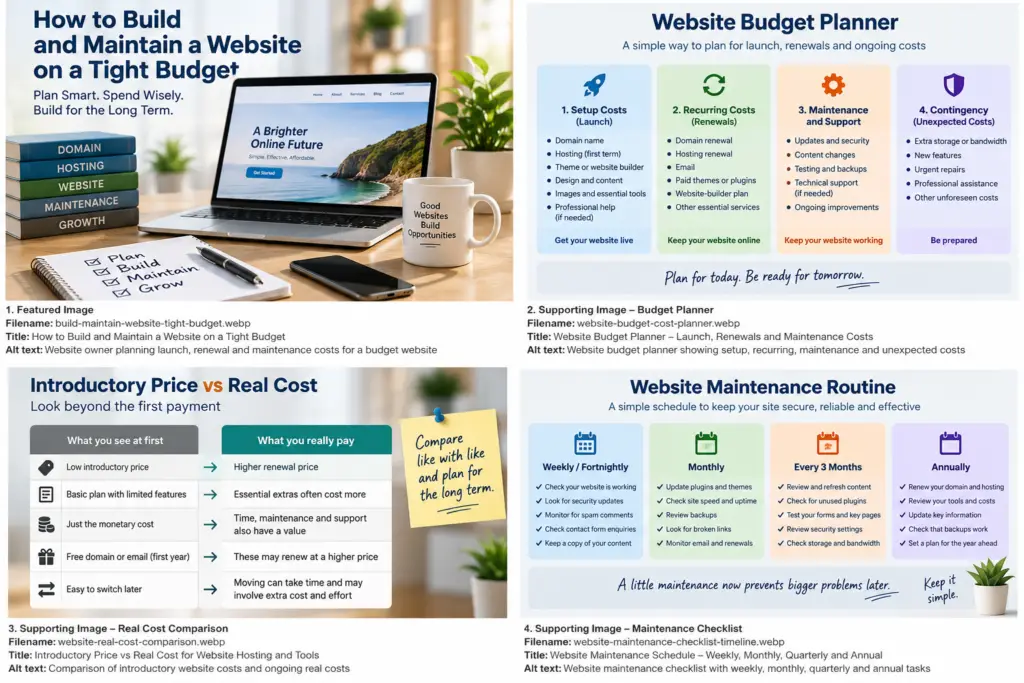
Start by separating the budget into three groups:
- Setup costs: The domain, initial hosting payment, theme or website builder, design, content, images and any professional help required before launch.
- Recurring costs: Domain and hosting renewals, email, paid themes or plugins, website-builder plans and other services the site will continue to use.
- Maintenance and support: The time or professional assistance needed for updates, testing, content changes, repairs and other ongoing work.
Not every website needs every item. A simple information site may only require a domain, suitable hosting, a manageable theme, useful content and a working contact form. A shop, membership site or booking website will usually have more functions and continuing costs.
Work out two totals, not one
Create one total for launching the website and another for keeping it through a normal renewal year.
Your launch total is the amount you need to pay before or around the time the website goes live.
Your ongoing total includes the services and maintenance the website is likely to require once introductory discounts have ended.
For each paid service, record:
- the amount due now;
- how long that payment covers;
- the expected renewal price;
- the renewal date;
- whether automatic renewal is enabled.
This gives you a more realistic picture than one combined figure. It also makes it easier to see whether a low opening price reflects a genuine saving or simply postpones part of the expense.
When several services are bundled together, note what is included and whether those inclusions continue at renewal. Avoid counting the same item twice, but do not assume that something included today will remain free indefinitely.
Include maintenance before the website launches
Maintenance belongs in the budget from the beginning, even when you intend to do most of the work yourself.
Your plan should allow for the time or help required to:
- keep the website software current;
- confirm that forms and important functions work;
- check that backups are completing;
- correct outdated information;
- review important pages on a phone;
- respond when something breaks or behaves unexpectedly.
You do not need to predict every future maintenance task. You do need to decide who will take responsibility and whether occasional professional assistance should be allowed for.
Your own time also has value. A setup that saves a small amount but requires hours of avoidable troubleshooting may not be the economical option it first appeared to be.
Keep a small website buffer
When possible, keep a modest amount available for an unexpected repair, an essential plugin renewal, a support task or an urgent content change.
The buffer does not need to cover a complete redesign. Its purpose is to prevent a small website problem from becoming a financial emergency or being ignored until it grows into a larger one.
A realistic budget will not predict every cost perfectly. It will make the known commitments visible and leave some room for the unexpected.
Once you can see the launch cost, the normal ongoing cost and the maintenance responsibility, you are in a much better position to choose a website setup you can genuinely afford to keep.
Choose a Website Setup You Can Maintain
A budget website is easier to own when its setup is simple enough to understand and capable enough to do the required job.
The domain, hosting and theme may each appear affordable. Complexity is what often creates the hidden cost: too many plugins, unfamiliar services, difficult page layouts or custom work that nobody knows how to maintain.
The aim is not to build the smallest website possible. It is to choose a setup that gives you the functions you need without creating more maintenance than you can realistically handle.
Choose the platform before buying the extras
Decide which type of website platform suits the project before paying for themes, plugins or add-ons.
WordPress can be a practical choice for people who want control over their content, hosting, design and future development. It offers a wide selection of free and paid themes and plugins, but it also brings responsibility for updates, backups, security and hosting. If WordPress is the right fit for your project, our step-by-step guide to building a WordPress website with Astra walks through the setup process.
A hosted website builder may reduce some of that technical responsibility by combining the editing system, hosting and support. That can make a simple website easier to manage, although additional features may require higher-priced plans and there may be less flexibility over how the site is moved or developed later.
Neither approach is automatically cheaper or better.
Before choosing, ask:
- Can the platform perform the website’s main job without several workarounds?
- Can I make ordinary content changes myself?
- Which maintenance tasks will remain my responsibility?
- Will I need paid extensions to obtain essential functions?
- Does the platform suit my current confidence and available time?
Choose according to the website you are actually building—not the one a sales page suggests you may need in several years.
Keep the first version simple
A tight-budget website does not need to look cheap. It needs to be clear, consistent and easy to use.
For the first version, concentrate on:
- a logical page structure;
- readable text and spacing;
- clear navigation;
- a mobile-friendly layout;
- useful, properly sized images;
- obvious contact or action buttons;
- pages that load without unnecessary clutter.
A consistent design is also easier to maintain. When pages follow the same basic structure, you can update information or add new content without redesigning the website each time.
Complex animation, unusual layouts and decorative effects may have a place, but they should not make it harder for visitors to understand the site—or harder for you to update it.
Add tools only when they solve a real problem
Plugins and add-ons can provide useful functions, but every additional tool creates something else to update, understand and potentially pay for.
Before installing one, ask:
- What specific problem does this solve?
- Does the website need it now?
- Can an existing tool already perform the same task?
- Is it actively supported and compatible with the current setup?
- Will I know how to update, replace or remove it later?
Do not reject a tool simply because it is paid. A dependable plugin or service can be worthwhile when it protects an important function, replaces manual work or saves enough time to justify the cost.
The problem is not paying for good tools. It is allowing the website to become dependent on a collection of tools selected without a clear plan.
Build lean, not fragile
A lean website includes what it needs and postpones what it does not.
A fragile website saves money by weakening the parts that keep it dependable.
Avoid cutting costs by:
- skipping workable backups;
- using abandoned or unsupported software;
- choosing hosting that cannot support the site’s ordinary needs;
- relying on numerous free plugins that overlap or conflict;
- accepting custom work that is not explained or documented;
- building pages so awkward that routine updates become difficult.
Those decisions may reduce the first payment, but they can make the website harder to repair, transfer or develop.
A good budget setup is one you can understand, maintain and improve. It should help the website become a useful asset—not create a technical problem that becomes more expensive each time the site changes.
Compare the Real Cost, Not Just the Introductory Price
Once you know what the website needs, compare suitable options using the same criteria. When you are ready to compare providers, our Hosting Reviews for 2026 look at the wider picture rather than just the headline price.
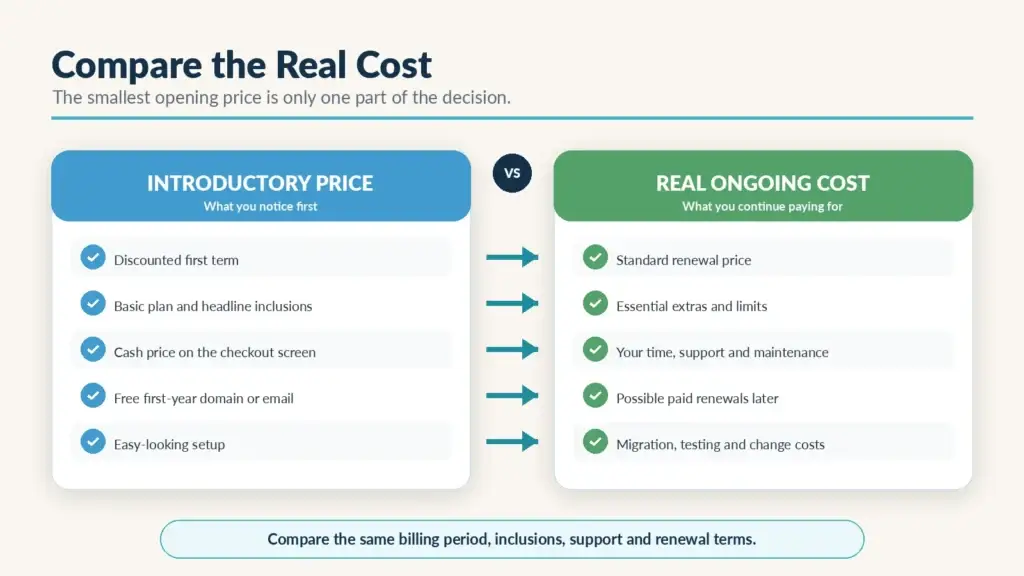
This is particularly important with hosting, domains, website builders, themes and plugins. An introductory offer can provide genuine savings, but only when you understand how long it lasts, what the service will cost later and which essentials are not included.
The goal is not to find the smallest advertised number. It is to find the least expensive option that meets the website’s requirements without creating avoidable costs or complications.
Compare like with like
Two plans are not directly comparable simply because both are described as suitable for a small website.
Before deciding that one option is cheaper, check:
- the total amount due today;
- how long the introductory term lasts;
- the standard renewal price;
- whether a long upfront commitment is required;
- the currency and whether applicable taxes are included;
- how many websites the plan supports;
- the storage, traffic and other resource limits;
- whether SSL, email, backups and migration are included;
- whether restoring a backup costs extra;
- the type and availability of support;
- the cancellation, refund and downgrade conditions.
Count an included feature as valuable only when the website genuinely needs it.
Hosting for several websites may be useful when you plan to use that capacity. It does not automatically represent better value for someone building one small site. In the same way, an email service, security package or premium support plan is not a saving when it duplicates something you already have.
Treat bundles and checkout extras as separate purchasing decisions. Ask what problem each item solves and whether the website already has another way to solve it.
Calculate the cost beyond the first payment
Create two cost figures for each option:
- First-term cost: The amount due now, plus any essential services or tools that must be purchased separately.
- Normal ongoing cost: The standard renewal price, plus the recurring extras and maintenance the website is likely to require.
When the billing periods differ, convert them to the same period before comparing them. A price displayed as a monthly equivalent may still require payment for one, two or three years in advance.
Your calculation may need to include:
- hosting;
- domain registration and renewal;
- business email;
- essential themes or plugins;
- backup or security services not already included;
- maintenance or technical assistance.
A free domain for the first year can still have a later renewal cost. A plugin purchased with an introductory discount may renew at its standard rate. Neither offer is necessarily unsuitable, but the later payment belongs in the decision.
You do not need to forecast the cost for the next decade. Comparing the initial term with the first normal renewal period is usually enough to reveal whether an apparently inexpensive setup remains affordable.
If you are deciding whether paying for hosting is worthwhile at all, our guide to free vs paid website hosting explains where the real differences begin to matter.
Include your time, support and the cost of changing later
The option with the lowest direct fee may not remain the least expensive once your time is included.
A service that requires repeated troubleshooting, difficult manual work or long support conversations can cost very little in fees while consuming hours that could have been used elsewhere. A slightly more expensive service may offer better value when it includes a manageable dashboard, dependable backups, useful migration assistance or support that resolves genuine problems.
Before choosing, ask:
- Can I manage the ordinary settings and content changes?
- What support is included, and how can it be contacted?
- Can I restore the website from a backup?
- What happens if the website reaches a resource limit?
- Can the plan be upgraded or downgraded?
- How difficult would it be to move the website elsewhere?
- Would moving also affect the domain or email?
- Am I choosing this because it suits the website, or only because the opening price is low?
Changing providers also has a cost. Migration, testing, email changes and possible disruption should be considered before moving solely to save a small amount.
That does not mean remaining indefinitely with an unsuitable service. It means comparing the likely saving with the time, risk and work involved in obtaining it.
Compare professional quotes by scope
When paying a designer, developer, writer or maintenance provider, compare what each quote includes—not only the total at the bottom.
A useful quote should make clear:
- which pages, layouts or functions are included;
- who will provide the written content and images;
- how many revisions are allowed;
- whether mobile and tablet layouts will be checked;
- whether forms, booking tools or other functions are included;
- who will purchase and own any paid licences;
- whether training or a handover is provided;
- what support is available after completion;
- which costs will continue after the project ends.
Two quotes described as covering the same website may contain very different amounts of work. The lower quote may be completely suitable, but first confirm that nothing essential has been omitted.
When a quote is beyond the available budget, ask what can be postponed or supplied by you. You might begin with fewer pages, provide organised photographs, delay an advanced booking system or add another service section later.
Reducing the scope is usually safer than weakening the foundations.
Do not save money by giving up essential account access, reliable backups, reasonable mobile testing or a proper handover. An optional feature can be added later; recovering control of a poorly documented website may be much harder.
Compare the complete offer, the normal ongoing commitment and the amount of work the setup will require from you. The strongest budget choice is not necessarily the cheapest one today. It is the option that meets the website’s real needs at a cost you can continue to manage.
Plan for Growth Without Paying Too Early
A website should be able to change, but that does not mean paying for the largest hosting plan or every feature you might one day use.
Planning for growth means preserving your options, understanding the next sensible step and spending more when the website gives you a genuine reason to do so.
Most websites grow gradually. You may publish more articles, add another service page, create a new landing page or introduce an additional enquiry form. Changes like these do not necessarily require a new platform or a more expensive hosting plan.
Build for what the website needs now while making sure future development will not be unnecessarily difficult.
Keep the Website Easy to Change
A flexible website begins with practical control and organisation rather than expensive infrastructure.
Wherever possible:
- keep the domain, hosting and important website accounts accessible to you;
- use a supported platform, theme and essential plugins;
- organise pages, images and other content clearly;
- maintain usable backups;
- keep a record of paid tools and licences;
- document important custom work;
- avoid unnecessary dependence on tools that make your content difficult to export or move.
These choices make ordinary changes easier and reduce the risk of discovering later that an unavailable provider, former employee or undocumented piece of software controls something essential.
You do not need to make every future decision now. You do need to avoid closing off your options without a good reason.
Check the Upgrade and Exit Paths
Before choosing hosting, a website builder or another important service, find out what happens when the website’s needs change.
Ask:
- Can the current plan be upgraded without rebuilding the website?
- Can it also be downgraded if the additional capacity is no longer needed?
- What does the next suitable plan cost?
- What happens if the website reaches a storage, traffic or resource limit?
- Is migration assistance available?
- Can the website content and data be exported?
- Are the domain and email services separate from the website?
- Would moving elsewhere require specialist help or additional fees?
You may never need to move or upgrade, but knowing the available paths before committing can prevent an expensive surprise.
Cloud hosting, managed WordPress hosting, virtual private servers and higher-tier website-builder plans can each suit particular websites. None should be treated as the automatic next step simply because a website has begun to grow.
The right upgrade is the one that solves a specific problem.
Upgrade in Response to Evidence
Hosting companies and software providers may suggest larger plans before a small website genuinely needs them. Treat those messages as offers—not proof that the current setup is inadequate.
An upgrade may be justified when:
- the website is consistently approaching genuine resource limits;
- sustained traffic or transactions require additional capacity;
- the business needs a function the current setup cannot provide;
- reliability or support requirements have changed;
- managing the present arrangement takes more time than a better service would cost;
- the website is producing enough value to justify further investment.
Before paying more, confirm what is causing the problem.
A slow website, for example, does not always need a larger hosting plan. Oversized images, unnecessary plugins, poor caching or complicated page layouts may be contributing to the issue. Buying more resources without investigating the cause can increase the bill without improving the site.
Apply the same principle to new features. Do not pay for ecommerce, memberships, advanced booking tools or premium marketing systems because you may use them eventually. Add them when they become part of a genuine plan and when you are ready to maintain them.
Review the setup before important renewals or major changes. When the current plan still performs the required job, there may be no reason to replace it. When it no longer suits the website, compare the cost of staying with the time, expense and risk involved in moving.
Planning for growth does not mean predicting every future requirement. It means building a website that can take its next sensible step without making you pay today for capacity, features or complexity it may never need.
Maintain the Website With a Simple Routine
A website does not need constant tinkering, but it does need someone to take responsibility for it.
Regular maintenance protects the money and time already invested in the site. It also helps prevent small problems—a broken enquiry form, an unsuccessful backup, an expired service or an abandoned plugin—from quietly becoming expensive ones.
For a small website, the most useful approach is to decide:
- what needs to be checked;
- how often it should be checked;
- who is responsible;
- what should happen when a problem is found.
The routine does not need to be elaborate. It needs to be clear enough that someone will actually follow it.
Back Up Before Making Important Changes
Before updating software, changing a theme, installing a plugin or editing something significant, make sure a recent backup exists and that you understand how the website would be restored.
Do not rely only on seeing the word “backup” in a hosting dashboard. Check:
- what is being backed up;
- how frequently backups run;
- how long copies are retained;
- where they are stored;
- whether you can download an independent copy;
- whether restoration is included or costs extra;
- who would restore the website if something went wrong.
Before a substantial change, create or confirm a fresh backup. When practical, test major design, software or code changes on a staging copy rather than experimenting on the live site.
For routine WordPress updates, avoid changing everything at once. Update a manageable group, then check the public website before continuing. If WordPress, the theme and numerous plugins are all updated together, identifying the cause of a problem can become much harder.
After an update, visit the public site rather than relying only on the success message inside the dashboard. Check the homepage, an important internal page and the website’s main enquiry, booking or purchasing function.
Test the Functions That Matter Most
A website can look normal while an important function has stopped working.
Base your testing on the main job you defined for the website at the beginning of this guide.
For a service business, the priority may be the enquiry form and telephone link. For an online shop, it may be the product, cart, checkout and payment process. For a blog, it may be the publication layout, navigation and links between related articles.
Regularly check:
- contact and enquiry forms;
- email and telephone links;
- booking or payment functions;
- important buttons and calls to action;
- navigation menus;
- links to essential pages;
- confirmation messages and automated emails;
- the main pages on a mobile phone.
Occasionally submit a real test enquiry. Confirm that the form submits correctly, the message reaches the intended inbox and the visitor receives any promised confirmation.
Do not only test what appears on the screen. Follow the complete path a genuine visitor would take.
When a website is intended to generate enquiries, bookings or sales, these checks are more important than repeatedly adjusting decorative details.
Follow a Maintenance Schedule You Can Sustain
The appropriate schedule depends on the website. A busy shop or membership site will normally require closer attention than a small information site that changes only occasionally.
For a modest website, the following timetable is a practical starting point.
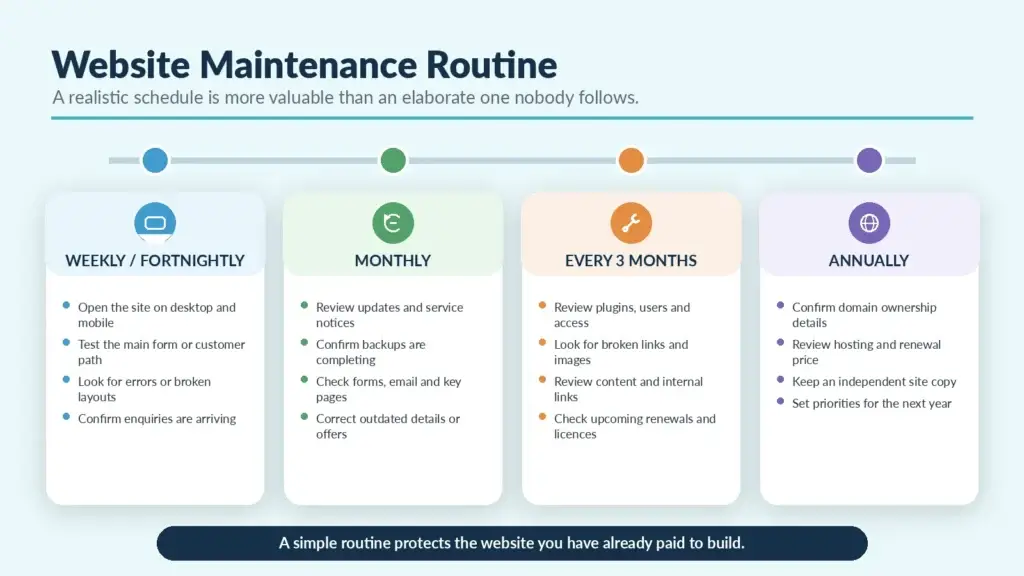
Every week or fortnight
- open the public website on a computer and a mobile phone;
- check that the main pages load normally;
- test the principal form, booking process or purchase path;
- look for obvious errors, warnings or broken layouts;
- confirm that important enquiries are reaching the correct destination.
Each month
- review available WordPress, theme and plugin updates where applicable;
- confirm that backups are completing successfully;
- check important pages after updates;
- review security, hosting or service notifications;
- remove obvious spam or unwanted submissions;
- correct outdated contact details, prices, hours or offers;
- investigate anything that has become unusually slow.
Every three months
- review installed themes, plugins and other tools;
- remove software that is no longer required;
- check which users have administrative access;
- look for broken links, missing images or outdated instructions;
- review key pages on different screen sizes;
- check approaching renewals and paid licences;
- review older articles and important internal links;
- confirm that recovery email addresses and account details are current.
Each year
- confirm the ownership and contact details for the domain;
- review the hosting plan and its next renewal price;
- check annual theme, plugin and software licences;
- retain an independent copy of important website files and data;
- review whether the current platform and hosting still suit the site;
- decide what the website needs to achieve during the coming year.
This is a starting point, not a rigid rule.
A website that processes payments, stores customer information or supports an essential part of the business may need more frequent monitoring and specialist attention. A simple personal site may need less.
The best maintenance schedule is not the most impressive one. It is the one that matches the website’s importance and is likely to be followed.
Maintain the Content as Well as the Software
Website maintenance is not limited to updates, backups and security.
A technically functioning website can still lose value when its information becomes inaccurate or neglected. Old prices, discontinued services, incorrect opening hours, missing staff members and outdated claims can damage confidence even when the technology is working perfectly.
During regular reviews, ask:
- Are the services or products still available?
- Are prices, conditions and service areas current?
- Do the contact details still reach the correct person?
- Are opening hours accurate?
- Are screenshots and instructions still correct?
- Do older articles need updating, combining or removing?
- Are there newer pages that should link to this content?
- Do important external links still lead to useful pages?
- Does the page still help the visitor complete its intended action?
Content maintenance can also reveal opportunities.
An article attracting visitors may deserve a clearer next step, an updated recommendation or links to newer related guides. A service page receiving little attention may need better information rather than a complete redesign.
The goal is not to rewrite the entire website every month. It is to prevent useful content from slowly becoming unreliable.
Keep a Record and Use the Tools You Already Have
A simple maintenance record can save time when a problem appears.
Record:
- the date;
- what was updated or changed;
- who made the change;
- whether a backup was confirmed;
- any problem discovered;
- how it was resolved;
- anything that needs to be checked again.
This can be a straightforward spreadsheet or document. It does not require specialist software.
A maintenance log becomes particularly useful when several people work on the website. It helps prevent duplicated work, makes recurring problems easier to recognise and gives a developer or support provider useful background when assistance is needed.
Keep a separate record of:
- important accounts;
- service providers;
- paid licences;
- renewal dates;
- account owners;
- recovery email addresses.
Store passwords in a suitable password manager rather than placing them directly in an ordinary spreadsheet.
Before buying another backup, security, monitoring or maintenance service, also check what is already included with the hosting plan, website platform and existing tools. You can also see the tools, platforms and services we currently use on our Website Hosting Resources page.
You may already have access to:
- automatic backups;
- staging;
- security monitoring;
- uptime alerts;
- performance information;
- spam protection;
- software updates;
- technical support.
An included feature is useful only when you understand what it does and where its limits are. Do not assume that every feature described as a “backup” or “security tool” provides the same protection.
Avoid paying for several services that perform substantially the same job. At the same time, do not rely on an included feature merely because it costs nothing extra. It still needs to meet the website’s requirements.
The most economical maintenance setup is usually a small number of suitable tools, a clear routine and someone who knows they are responsible.
A short routine that is consistently followed will protect the website more effectively than an elaborate maintenance plan that is repeatedly postponed.
Decide What to Do Yourself — and What to Pay For
Doing some website work yourself can make a limited budget go further. It can also help you understand the site well enough to make ordinary changes without seeking assistance every time.
DIY work is only economical, however, when the task is within your capabilities, the risks are manageable and the time spent learning is justified.
Do not compare a professional fee with a cost of zero. Compare it with:
- the hours you may spend learning and completing the task;
- the delay to the project;
- the consequences of making a mistake;
- the possible cost of repairing that mistake;
- whether the skill will be useful to you again.
Sometimes learning the task is a worthwhile investment. At other times, paying for a clearly defined piece of work is the less expensive decision.
Start With Low-Risk, Repeatable Work
The best tasks to handle yourself are generally those that are easy to understand, reasonably safe to reverse and likely to be repeated.
Depending on your confidence and the website setup, these might include:
- gathering accurate business information;
- drafting and updating page content;
- selecting, naming and organising photographs;
- resizing and compressing images;
- publishing articles;
- correcting ordinary text;
- updating contact details, opening hours or service information;
- checking links and buttons;
- submitting test enquiries;
- recording renewal dates.
Learning these tasks can reduce ongoing costs because they are part of the normal life of a website.
Begin with small changes. Confirm that a backup exists, change one thing at a time and inspect the public page afterwards. Avoid altering several unfamiliar settings together, because that makes it harder to identify the cause if something goes wrong.
A useful rule is:
Learn on work that is low-risk, repeatable and easy to check.
Do not use an important live website as an experiment when an error could interrupt enquiries, sales, payments or essential email.
Pay for Risk, Complexity or Costly Delay
Professional help deserves stronger consideration when a task is technically complex, difficult to reverse or capable of affecting several important services at once.
Examples may include:
- moving a website between hosting providers;
- changing domain, DNS or business-email settings when you are unsure of the consequences;
- cleaning a compromised website;
- restoring missing files or data;
- repairing repeated update failures;
- diagnosing a serious performance problem;
- changing unfamiliar custom code;
- connecting third-party services;
- repairing a broken booking, checkout or payment process;
- working on a website that stores sensitive customer information.
The cost of delay also matters.
When a broken form is preventing genuine enquiries, spending several days experimenting may cost more than obtaining targeted assistance. When the website must be ready for a campaign, launch or important business event, the available time belongs in the calculation.
That does not mean every technical problem requires a large agency, an ongoing contract or a complete rebuild. A knowledgeable specialist may be able to complete a clearly defined repair, migration or configuration task.
Pay for the level of assistance the problem actually requires.
Use a Five-Question Decision Test
Before deciding whether to do the work yourself, ask:
- Do I understand the task and the outcome I am trying to achieve?
- Can the change be reversed if it does not work?
- Do I have a usable backup and know how the result will be tested?
- How long will it realistically take me to learn, complete and check the work?
- What could happen if I delay the task or get it wrong?
DIY work is a stronger choice when the instructions are clear, the risk is low, the result is easy to test and the skill is likely to be useful again.
Professional assistance deserves stronger consideration when:
- the cause of the problem is unclear;
- several systems are connected;
- important data, email or payment functions could be affected;
- the task is urgent;
- the website is losing enquiries or sales;
- the work requires knowledge you are unlikely to use again;
- repairing a mistake could cost more than doing the job correctly in the first place.
The purpose of this test is not to discourage learning. It is to direct your effort towards work that can genuinely save money without placing the website at unnecessary risk.
Share the Work and Define the Outcome
A website project does not need to be completely DIY or completely outsourced.
A mixed approach can control costs while placing the more demanding work in experienced hands. For example, you might:
- prepare the page list and business information before giving the project to a designer;
- draft the content yourself while paying for professional editing;
- collect, name and organise the images before supplying them;
- ask a developer to build the initial structure, then add routine content yourself;
- pay for a hosting migration but manage ordinary website updates afterwards;
- have someone configure the backup system, then learn how to confirm that it is working;
- purchase a short training or handover session instead of ongoing assistance you do not need.
Clear responsibilities matter. Decide who will provide the content, configure the website, test the functions and maintain the site after launch.
When requesting professional help, avoid a vague instruction such as “Please fix my website.” Prepare a short description explaining:
- what is happening now;
- what you expected to happen;
- which page, function or service is affected;
- when the problem began;
- whether anything changed beforehand;
- what you have already tried;
- the outcome you need;
- whether there is a deadline;
- whether a recent backup is available.
Screenshots and exact error messages can also reduce the time required to diagnose the problem.
Before approving the work, ask:
- What will be investigated or changed?
- What is included in the quoted amount?
- Is the price fixed, estimated or charged by time?
- Will additional work require approval?
- Will the website be backed up first?
- How will the result be tested?
- Will I receive an explanation of what was changed?
- Will the work introduce another licence, subscription or maintenance requirement?
A fixed quote may not be possible when the cause is unknown. In that situation, ask whether the provider can begin with a paid diagnostic stage, work within an agreed limit or contact you before exceeding a specified amount.
After significant work, request a brief handover covering what changed, where the important settings can be found and what you will need to maintain. Paying for assistance should not leave you unable to understand or control the website afterwards.
A sensible tight-budget approach is to handle the low-risk work you can repeat confidently and pay for experience where it is likely to prevent delay, damage or a larger repair bill.
Doing everything yourself is not always the cheapest option. Paying for everything is rarely necessary either. The value comes from knowing the difference.
Your Tight-Budget Website Checklist
Use this checklist before committing to the website setup, immediately before launch and again before important renewals or upgrades.
Each item should confirm that you have made a deliberate decision. It does not automatically mean buying another service or adding another feature.
Before You Buy or Build
Confirm that:
- you can describe the website’s main purpose in one sentence;
- you know which visitor the website is intended to help and which action you want them to take;
- you have separated launch essentials from ideas that can wait;
- the chosen platform can perform the website’s main job without several awkward workarounds;
- you know the amount due now and the likely cost at normal renewal;
- you understand the billing period, currency, automatic-renewal setting and cancellation conditions;
- you know which essential features are included and which cost extra;
- you have allowed for maintenance time, occasional help and a small unexpected-cost buffer where possible;
- the domain, hosting account, recovery email address and important licences will remain accessible to you or the business;
- you understand how the website can be upgraded, downgraded, exported or moved later.
Do not approve a purchase simply because it is discounted. Ask which requirement it meets and what it will cost while you continue using it.
Before You Launch
Confirm that:
- the essential pages are complete and the information is accurate;
- visitors can quickly understand what the website offers and what to do next;
- the site is readable and usable on both a computer and a mobile phone;
- navigation, buttons, telephone links and email links work;
- unfinished sections, placeholder text and unnecessary test content have been removed;
- important images display correctly and are not unnecessarily large;
- a genuine test enquiry reaches the correct inbox;
- any promised confirmation message or automated email is received;
- booking, cart, checkout or payment functions have been tested where applicable;
- important internal links lead to the intended pages;
- the website loads through a secure HTTPS connection;
- a recent backup exists and you know how restoration would be handled;
- administrator access and account-recovery details are current.
It can also help to ask someone unfamiliar with the project to complete the website’s main task without instructions.
Ask them to find a service, understand the offer, submit an enquiry or complete a purchase. Notice where they hesitate. A short real-world test can reveal problems that the person building the site has become too familiar with to see.
After Launch
Confirm that:
- one person is responsible for the website;
- a realistic maintenance schedule has been agreed;
- hosting, domain, plugin and other renewal dates are recorded;
- important forms, buttons and customer journeys will be tested regularly;
- backups will be checked rather than merely assumed to be working;
- software, content and account access will be reviewed periodically;
- outdated prices, services, contact details and instructions will be corrected;
- significant changes and recurring problems will be recorded;
- there is a plan for obtaining help when a task exceeds your confidence or experience.
Before paying for an upgrade, a larger hosting plan or another tool, ask:
- What specific problem am I trying to solve?
- What evidence shows that the website needs this change?
- Can the current setup already solve the problem?
- What will the change cost now and at renewal?
- Will it replace an existing expense or add another one?
- How much time will it save?
- What additional maintenance will it create?
- Can it be removed or replaced later without damaging the website?
Finish with one final question:
Can I afford not only to launch this website setup, but also to keep it current, dependable and useful?
When the answer is yes—and you understand what you own, what renews and who will maintain it—you have a workable website budget rather than merely a low opening price.
Build a Website You Can Afford to Keep
A tight budget is not a reason to build a careless website. It is a reason to decide what matters, understand the ongoing cost and avoid paying for complexity before the site needs it.
Begin with the job the website must perform. Choose a setup you can manage, keep control of the important accounts and allow for renewals, maintenance and occasional help. Add features when they solve a real problem or support a clear opportunity—not simply because they are available.
Once the website is live, test the parts that matter, keep its information accurate and review costs before they renew. Improve it in response to evidence: visitor needs, recurring problems, growing traffic or work that now consumes more time than it is worth.
A modest website can still become a valuable asset when its purpose is clear, its foundations are dependable and its upkeep is realistic.
The goal is not to launch the cheapest website possible. It is to build the most useful website you can afford to keep.
Last updated: September 2026
Written by Martin Cohn
Martin builds and manages websites through Blue Ginger Studio, drawing on practical experience across a growing portfolio of business, content and affiliate websites.